
參與GitHub中的項(xiàng)目開(kāi)發(fā),最常用和推薦的首選方式是“Fork + Pull”模式。在“Fork + Pull”模式下,項(xiàng)目參與者不必向項(xiàng)目創(chuàng)建者申請(qǐng)?zhí)峤粰?quán)限,而是在自己的托管空間下建立項(xiàng)目的派生(Fork)。
如果一個(gè)開(kāi)源項(xiàng)目派生出另外的項(xiàng)目,通常意味著項(xiàng)目的分裂和開(kāi)發(fā)團(tuán)隊(duì)的削弱,而GitHub中的項(xiàng)目派生則不會(huì),而且正好相反,GitHub中的項(xiàng)目派生是項(xiàng)目壯大的體現(xiàn)。所有的派生項(xiàng)目都會(huì)有鏈接指向原始項(xiàng)目,派生項(xiàng)目沒(méi)有獨(dú)立的缺陷追蹤系統(tǒng)(ISSUE),而是必須利用創(chuàng)建者本人的項(xiàng)目中的缺陷追蹤系統(tǒng)。至于在派生項(xiàng)目中創(chuàng)建的提交,可以非常方便地利用GitHub的Pull Request工具向原始項(xiàng)目的維護(hù)者發(fā)送Pull Request。
下面以GotGit版本庫(kù)為例,介紹如何利用GitHub提供的Fork和Pull Request工具實(shí)現(xiàn)工作協(xié)同。
## 4.1.1\. 版本庫(kù)派生
GotGit版本庫(kù)[[1]](https://github.com/gotgit/gotgit/)用于維護(hù)《Git權(quán)威指南》一書(shū)的官網(wǎng)和勘誤,下面演示的勘誤表修改是由王勝[[2]](https://github.com/wangsheng/)通過(guò)GitHub之外的一個(gè)缺陷追蹤平臺(tái)報(bào)告的[[3]](http://redmine.ossxp.com/redmine/issues/161)。他在報(bào)告中,甚至直接用GNU diff格式告訴我該如何修改。
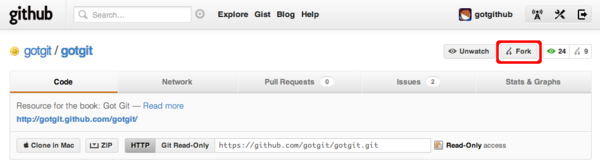
下面就以用戶(hù)gotgithub身份,訪問(wèn)版本庫(kù)?[https://github.com/gotgit/gotgit/](https://github.com/gotgit/gotgit/)?,添加新的勘誤。如圖4-1所示,gotgit項(xiàng)目在之前的示例中已經(jīng)被我們關(guān)注但尚未Fork。
[](https://box.kancloud.cn/2015-07-09_559de342e98b2.png)
圖4-1:原gotgit項(xiàng)目
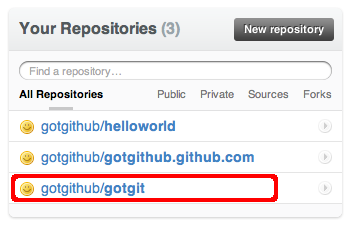
點(diǎn)擊項(xiàng)目名稱(chēng)右側(cè)的Fork按鈕,便在gotgithub用戶(hù)自己的托管空間下創(chuàng)建項(xiàng)目派生,派生項(xiàng)目版本庫(kù)出現(xiàn)在版本庫(kù)列表中,如圖4-2。
[](https://box.kancloud.cn/2015-07-09_559de344b3dce.png)
圖4-2:gotgithub用戶(hù)的項(xiàng)目列表
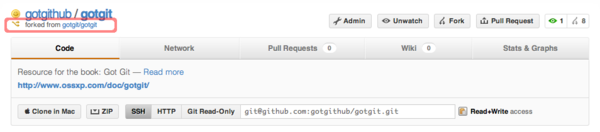
訪問(wèn)派生后的版本庫(kù),會(huì)發(fā)現(xiàn)和派生前的幾乎相同,除了沒(méi)有缺陷跟蹤(ISSUE),以及標(biāo)識(shí)了該項(xiàng)目派生之前的原路徑等。如圖4-3所示。
[](https://box.kancloud.cn/2015-07-09_559de34550c4e.png)
圖4-3:派生的gotgit項(xiàng)目
現(xiàn)在gotgithub用戶(hù)就在本地派生的版本庫(kù)中提交。
* 克隆 gotgithub/gotgit 版本庫(kù)。
~~~
$ git clone git@github.com:gotgithub/gotgit.git
$ cd gotgit
~~~
* 為了向問(wèn)題的發(fā)現(xiàn)者致敬,并經(jīng)王勝同意,以他的身份進(jìn)行提交。
~~~
$ git config user.name "Wang Sheng"
$ git config user.email wangsheng@ossxp.com
~~~
* 編輯errata.mkd文件(版本庫(kù) gotgit/gotgit 已將勘誤文件重命名為errata.md。),錄入新發(fā)現(xiàn)的書(shū)中的文字錯(cuò)誤。
~~~
$ vi errata.mkd
~~~
* 對(duì)error.mkd的改動(dòng)如下:
~~~
$ git diff
diff --git a/errata.mkd b/errata.mkd
index b0b68fb..29e40cf 100644
--- a/errata.mkd
+++ b/errata.mkd
@@ -14,5 +14,6 @@
| 66 | 倒數(shù)第11行 | Author(提交者) | Author(作者) | [Github#2](http://github.com/gotgit/gotgit/issues/2) |
| 144 | 第1行 | \`$ **git rev-parse A^{tree} A:** | $ **git rev-parse A^{tree} A:** | [#153](http://redmine.ossxp.com/redmine/issues/153) |
| 218 | 第8行 | 況下,Gits標(biāo)識(shí)出合并沖突, | 況下,Git標(biāo)識(shí)出合并沖突, | [#159](http://redmine.ossxp.com/redmine/issues/159) |
+| 369 | 第21行 | 但 `-i` 參數(shù)僅當(dāng)對(duì)一個(gè)項(xiàng)執(zhí)行時(shí)才有效。 | 但 `-i` 參數(shù)僅當(dāng)對(duì)一個(gè)項(xiàng)目執(zhí)行時(shí)才有效。 | [Github#3](http://github.com/gotgit/gotgit/issues/3) |
| 516 | 倒數(shù)第15行 | **oldtag="cat"** | **oldtag=\`cat\`** | [#151](http://redmine.ossxp.com/redmine/issues/151) |
~~~
* 提交修改。至于提交說(shuō)明中出現(xiàn)的編號(hào),是為了和缺陷跟蹤系統(tǒng)關(guān)聯(lián),會(huì)在后面章節(jié)介紹。
~~~
$ git add -u
$ git commit -m "Fixed #3: should be 項(xiàng)目, not 項(xiàng)."
~~~
* 推送提交到GitHub。
~~~
$ git push
~~~
訪問(wèn)GitHub上的派生項(xiàng)目頁(yè)面,會(huì)看到以用戶(hù)whangsheng在master分支[[5]](版本庫(kù) gotgit/gotgit 原master分支內(nèi)容已轉(zhuǎn)移至gh-pages分支,通過(guò)GitHub提供的網(wǎng)站部署機(jī)制完成網(wǎng)頁(yè)的編譯和部署。)創(chuàng)建的提交。如圖4-4所示。
[](https://box.kancloud.cn/2015-07-09_559de3466960d.png)
圖4-4:派生版本庫(kù)中的新提交
## 4.1.2\. Pull Request
那么如何能夠讓gotgit原始項(xiàng)目的創(chuàng)建者知道這個(gè)派生項(xiàng)目及新的提交呢?GitHub提供的工具就是“Pull Request”。注意到圖4-3右上方“Pull Request”按鈕了么?點(diǎn)擊該按鈕進(jìn)入Pull Request創(chuàng)建界面。
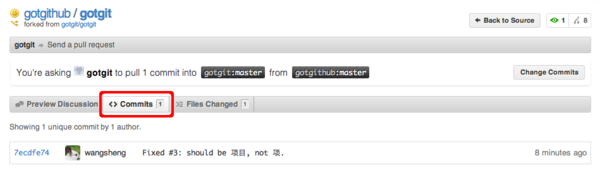
在彈出的Pull Request創(chuàng)建界面中,點(diǎn)擊菜單中的“Commits”,查看所包含的提交。如圖4-5所示。
[](https://box.kancloud.cn/2015-07-09_559de347923e1.png)
圖4-5:Pull Request包含的提交
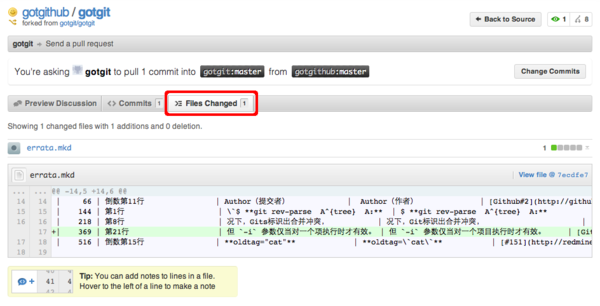
點(diǎn)擊菜單中的“Files Changed”,查看所包含的提交。如圖4-6所示。
[](https://box.kancloud.cn/2015-07-09_559de3490d978.png)
圖4-6:Pull Request包含的改動(dòng)差異
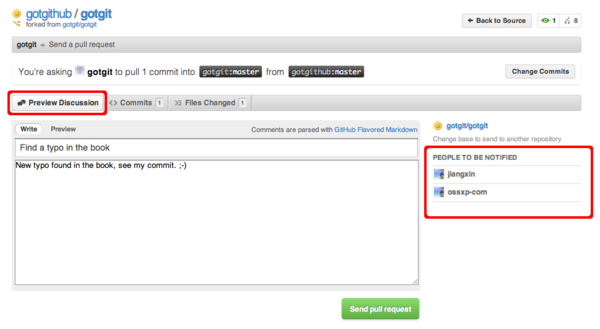
點(diǎn)擊菜單中的“Preview Discussion”,填寫(xiě)Pull Request的標(biāo)題和內(nèi)容,完成Pull Request的創(chuàng)建。如圖4-7所示。
[](https://box.kancloud.cn/2015-07-09_559de34ce80cb.png)
圖4-7:Pull Request的提交界面
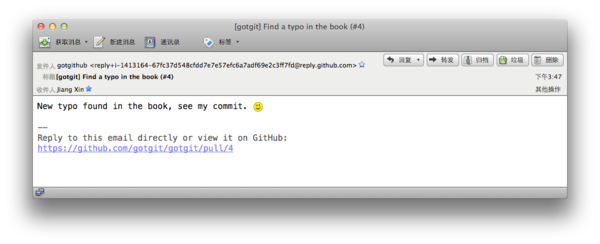
當(dāng)Pull Request發(fā)出后,項(xiàng)目gotgit的開(kāi)發(fā)者會(huì)收到通知郵件,如圖4-8所示。
[](https://box.kancloud.cn/2015-07-09_559de34f7043b.png)
圖4-8:Pull Request的通知郵件
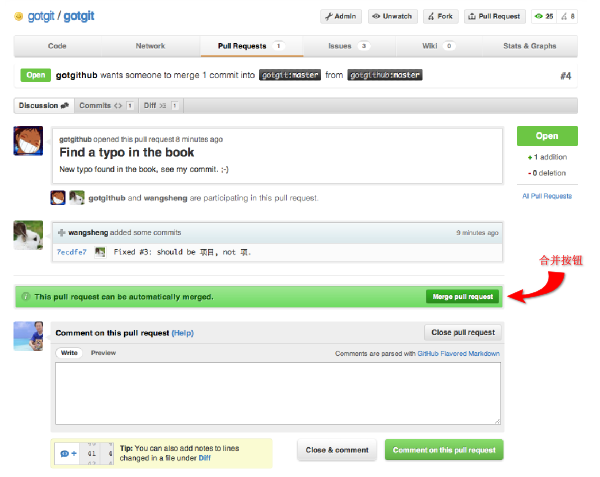
點(diǎn)擊郵件中的URL鏈接,以項(xiàng)目gotgit的開(kāi)發(fā)者(如ossxp-com)身份登錄,看到如圖4-9的視圖。之所以看到有兩個(gè)用戶(hù)參與到此Pull Request,是因?yàn)镻ull Request創(chuàng)建者和提交的作者是不同的用戶(hù)。圖4-9下方的表單可以向Pull Request追加評(píng)論,或者關(guān)閉此Pull Request。
[](https://box.kancloud.cn/2015-07-09_559de35462d3d.png)
圖4-9:Pull Request接收者視圖
GitHub如果檢測(cè)到Pull Request中包含的提交可以直接合并,會(huì)顯示自動(dòng)合并的提示信息,點(diǎn)擊圖4-9中提示信息中的自動(dòng)合并按鈕,顯示圖4-10的自動(dòng)合并對(duì)話(huà)框。
[](https://box.kancloud.cn/2015-07-09_559de35a0c812.png)
圖4-10:Pull Request的通知郵件
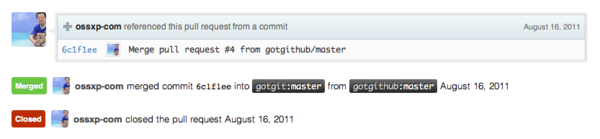
點(diǎn)擊“Confirm Merge”按鈕即完成Pull Request中所含提交的自動(dòng)合并。自動(dòng)合并完成后,Pull Request頁(yè)面下方會(huì)以評(píng)論的形式出現(xiàn)相關(guān)提示,并自動(dòng)關(guān)閉Pull Request。如圖4-11所示。
[](https://box.kancloud.cn/2015-07-09_559de35b1cb6d.png)
圖4-11:Pull Request關(guān)閉
## 4.1.3\. 手工合并
Pull Request提供的自動(dòng)合并顯示在提交日志中是什么樣子的呢?以用戶(hù)ossxp-com身份檢出版本庫(kù),會(huì)看到用戶(hù)wangsheng的提交已經(jīng)合并到版本庫(kù)中。
~~~
$ git clone git@github.com:gotgit/gotgit.git
$ cd gotgit
$ git log --graph -3
* commit 6c1f1ee152629fd2f8d00ebe92c27a32d068d756
|\ Merge: 00c6c4b 7ecdfe7
| | Author: OpenSourceXpress
| | Date: Tue Aug 16 01:23:47 2011 -0700
| |
| | Merge pull request #4 from gotgithub/master
| |
| | Find a typo in the book
| |
| * commit 7ecdfe7451412cfb2e65bb47c12cf2162e21c841
|/ Author: Wang Sheng
| Date: Tue Aug 16 10:17:53 2011 +0800
|
| Fixed #3: should be 項(xiàng)目, not 項(xiàng).
|
* commit 00c6c4bfab9824bd967440902ce87440f9e87852
| Author: Jiang Xin
| Date: Wed Aug 3 11:50:31 2011 +0800
|
| Change font color for stronger text from red to brown.
~~~
可以看出GitHub的自動(dòng)合并產(chǎn)生了一個(gè)合并提交,類(lèi)似執(zhí)行g(shù)it?merge?--no-ff命令。也就是說(shuō)即使用戶(hù)wangsheng的提交是一個(gè)“快進(jìn)式提交”(基于gotgit/gotgit版本庫(kù)最新提交所做的提交),也要產(chǎn)生一個(gè)合并提交。
可能有人并不喜歡這種用--no-ff參數(shù)的非標(biāo)準(zhǔn)的合并方式,因?yàn)檫@種合并產(chǎn)生了一個(gè)多余的提交,可能增加代碼評(píng)審的負(fù)擔(dān)。若要取消GitHub的自動(dòng)合并也很簡(jiǎn)單,因?yàn)镚it無(wú)所不能:
~~~
$ git reset --hard HEAD^ # 回退一個(gè)提交,即回退到當(dāng)前提交的第一個(gè)父提交
$ git rev-parse HEAD # 檢查是否正確的回退
00c6c4bfab9824bd967440902ce87440f9e87852
$ git push -f # 強(qiáng)制推送回退的 master 分支
~~~
下面就演示一下當(dāng)收到他人的Pull Request后,該如何手動(dòng)合并。實(shí)際上在很多情況下,Pull Request所含提交有可能造成合并沖突,那樣的話(huà)GitHub不再、也不能提供自動(dòng)合并功能,就必須采用手工合并的方式。
* 將Pull Request發(fā)出者的派生版本庫(kù)添加為一個(gè)新的源。
例如收到來(lái)自gotgithub用戶(hù)的Pull Request,不妨以gotgithub為名添加新的源。
~~~
$ git remote add gotgithub https://github.com/gotgithub/gotgit.git
~~~
* 此時(shí)版本庫(kù)中有兩個(gè)源,一個(gè)克隆時(shí)自動(dòng)建立的origin,另外一個(gè)就是新增加的gotgithub。
~~~
$ git remote -v
gotgithub https://github.com/gotgithub/gotgit.git (fetch)
gotgithub https://github.com/gotgithub/gotgit.git (push)
origin git@github.com:gotgit/gotgit.git (fetch)
origin git@github.com:gotgit/gotgit.git (push)
~~~
* 獲取遠(yuǎn)程版本庫(kù)gotgithub的分支和提交。
~~~
$ git fetch gotgithub
From https://github.com/gotgithub/gotgit
* [new branch] gh-pages -> gotgithub/gh-pages
* [new branch] master -> gotgithub/master
~~~
* 現(xiàn)在除了本地分支master外,還有若干遠(yuǎn)程分支,如下:
~~~
$ git branch -a
* master
remotes/gotgithub/gh-pages
remotes/gotgithub/master
remotes/origin/HEAD -> origin/master
remotes/origin/gh-pages
remotes/origin/master
~~~
* 將遠(yuǎn)程分支remotes/gotgithub/master(可簡(jiǎn)寫(xiě)為gotgithub/master)合并到當(dāng)前分支中。
~~~
$ git merge gotgithub/master
Updating 00c6c4b..7ecdfe7
Fast-forward
errata.mkd | 1 +
1 files changed, 1 insertions(+), 0 deletions(-)
~~~
* 查看提交說(shuō)明,看到此次合并沒(méi)有產(chǎn)生不必要的合并提交。
~~~
$ git log --graph -2
* commit 7ecdfe7451412cfb2e65bb47c12cf2162e21c841
| Author: Wang Sheng
| Date: Tue Aug 16 10:17:53 2011 +0800
|
| Fixed #3: should be 項(xiàng)目, not 項(xiàng).
|
* commit 00c6c4bfab9824bd967440902ce87440f9e87852
| Author: Jiang Xin
| Date: Wed Aug 3 11:50:31 2011 +0800
|
| Change font color for stronger text from red to brown.
~~~
* 將合并推送到GitHub版本庫(kù)中。
~~~
$ git push
~~~
## 4.1.4\. 在線(xiàn)編輯
GitHub提供了在線(xiàn)編輯功能,這樣可以無(wú)需克隆版本庫(kù)、無(wú)需使用Git即可完成對(duì)版本庫(kù)中文件的修改,甚至可以在你的iPad甚至iPhone上完成對(duì)文件的修改。
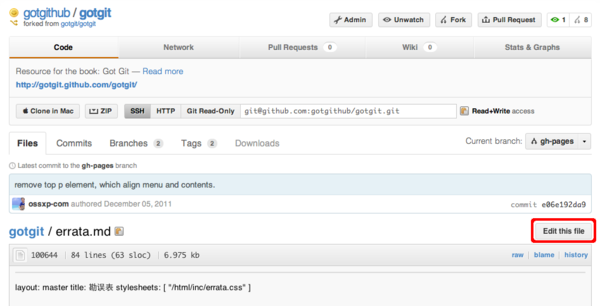
以gotgithub賬戶(hù)身份登錄GitHub,訪問(wèn)之前派生而來(lái)的版本庫(kù)gotgithub/gotgit中的文件,例如文件errata.md(版本庫(kù) gotgit/gotgit 已重構(gòu)。分支gh-pages中文件errata.md文件來(lái)自于原master分支的errata.mkd文件,地址:[https://github.com/gotgithub/gotgit/blob/gh-pages/errata.md](https://github.com/gotgithub/gotgit/blob/gh-pages/errata.md)),會(huì)看到其中一個(gè)“Edit this file”的按鈕,如圖4-12所示。
[](https://box.kancloud.cn/2015-07-09_559de35c55d5d.png)
圖4-12:瀏覽自己版本庫(kù)中文件
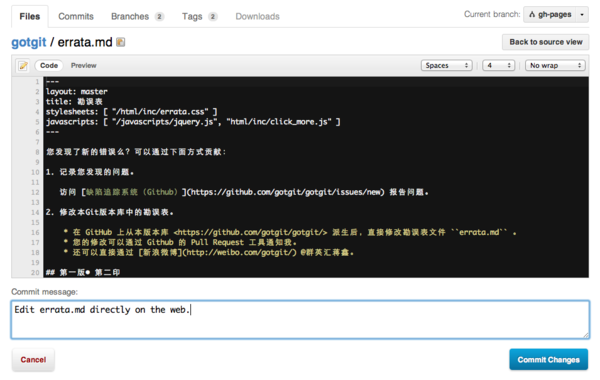
點(diǎn)擊圖4-12中的“Edit this file”按鈕,開(kāi)始在線(xiàn)編輯文件errata.md,編輯器還支持語(yǔ)法加亮,如圖4-13所示。
[](https://box.kancloud.cn/2015-07-09_559de35ede088.png)
圖4-13:編輯文件
## 4.1.5\. 簡(jiǎn)化的 Fork + Pull Request
到目前,我們已經(jīng)了解了GitHub的三大武器:Fork、Pull Request和在線(xiàn)編輯。對(duì)于最常用的“Fork + Pull Request”操作,GitHub還提供了一個(gè)快捷模式。即GitHub對(duì)于無(wú)權(quán)更改的他人版本庫(kù)中的文件,提供了一個(gè)類(lèi)似在線(xiàn)編輯的按鈕,名為“Fork and edit this file”按鈕,自動(dòng)完成版本庫(kù)派生和在線(xiàn)編輯,即將三大武器一勺燴。
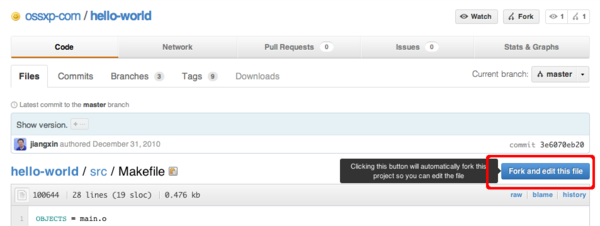
訪問(wèn)他人版本庫(kù)(尚未在自己空間派生)中的文件,例如訪問(wèn)下面地址:[http://git.io/hello-world-makefile](http://git.io/hello-world-makefile)(即地址?[https://github.com/ossxp-com/hello-world/blob/master/src/Makefile](https://github.com/ossxp-com/hello-world/blob/master/src/Makefile))。顯示他人(ossxp-com)版本庫(kù)hello-world中的src/Makefile文件,如圖4-14所示。
[](https://box.kancloud.cn/2015-07-09_559de3666e915.png)
圖4-14:瀏覽他人版本庫(kù)中文件
點(diǎn)擊圖4-14中的“Fork and edit this file”按鈕,會(huì)自動(dòng)在自己托管空間創(chuàng)建派生版本庫(kù),并開(kāi)始在線(xiàn)編輯文件src/Makefile,如圖4-15所示。
[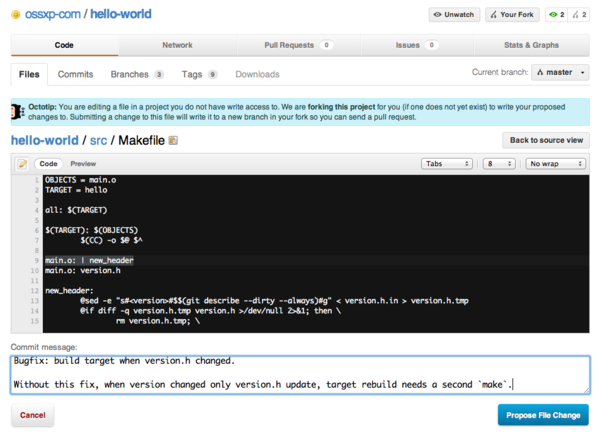](https://box.kancloud.cn/2015-07-09_559de36a50c35.png)
圖4-15:派生并編輯文件
文件修改完畢,點(diǎn)擊“Propose File Change”按鈕,會(huì)將改動(dòng)作提交到派生的版本庫(kù)中,并馬上開(kāi)啟一個(gè)新的Pull Request。如圖4-16所示。
[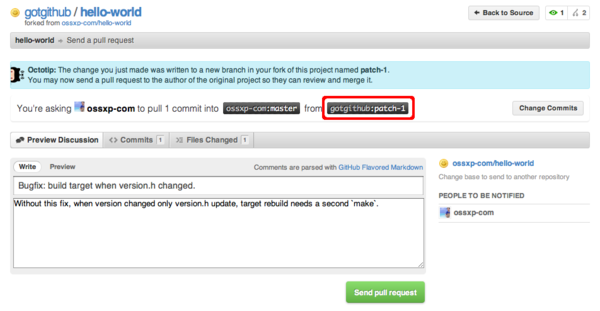](https://box.kancloud.cn/2015-07-09_559de37807da4.png)
圖4-16:編輯完畢自動(dòng)開(kāi)啟Pull Request
點(diǎn)擊“Send pull request”按鈕完成Pull Request的創(chuàng)建。如果仔細(xì)查看圖4-16,會(huì)發(fā)現(xiàn)Pull Request所包含的修改發(fā)生在gotgithub/hello-world派生版本庫(kù)中的patch-1分支中,并非通常的master分支。
原版本庫(kù)ossxp-com/hello-world的開(kāi)發(fā)者會(huì)收到一封郵件,通知有新的Pull Request,如下所示(前四行為信頭):
~~~
From: GotGitHub
Date: 2011/12/17
Subject: [hello-world] Bugfix: build target when version.h changed. (#1)
To: Jiang Xin
Without this fix, when version changed only version.h update, target rebuild needs a second `make`.
You can merge this Pull Request by running:
git pull https://github.com/gotgithub/hello-world patch-1
Or you can view, comment on it, or merge it online at:
https://github.com/ossxp-com/hello-world/pull/1
-- Commit Summary --
* Bugfix: build target when version.h changed.
-- File Changes --
M src/Makefile (3)
-- Patch Links --
https://github.com/ossxp-com/hello-world/pull/1.patch
https://github.com/ossxp-com/hello-world/pull/1.diff
---
Reply to this email directly or view it on GitHub:
https://github.com/ossxp-com/hello-world/pull/1
~~~
版本庫(kù)ossxp-com/hello-world的管理員既可以通過(guò)GitHub提供的圖形化界面完成對(duì) Pull Request 的審核和合并,也可以在命令行下完成。正如郵件中所述若使用命令行,操作如下:
~~~
$ git pull https://github.com/gotgithub/hello-world patch-1
~~~
- 前言
- 1. 探索GitHub
- 1.1. 什么是GitHub
- 1.2. GitHub亮點(diǎn)
- 1.3. 探索GitHub
- 2. 加入GitHub
- 2.1. 創(chuàng)建GitHub賬號(hào)
- 2.2. 瀏覽托管項(xiàng)目
- 2.3. 社交網(wǎng)絡(luò)
- 3. 項(xiàng)目托管
- 3.1. 創(chuàng)建新項(xiàng)目
- 3.2. 操作版本庫(kù)
- 3.3. 公鑰認(rèn)證管理
- 3.4. 版本庫(kù)鉤子擴(kuò)展
- 3.5. 建立主頁(yè)
- 4. 工作協(xié)同
- 4.1. Fork + Pull模式
- 4.2. 共享版本庫(kù)
- 4.3. 組織和團(tuán)隊(duì)
- 4.4. 代碼評(píng)注
- 4.5. 缺陷跟蹤
- 4.6. 維基
- 5. 付費(fèi)服務(wù)
- 5.1. GitHub收費(fèi)方案
- 5.2. GitHub企業(yè)版
- 6. GitHub副產(chǎn)品
- 6.1. GitHub:Gist
- 6.2. 其他版本控制工具支持
- 6.3. 客戶(hù)端工具
- 6.4. 其他
- 7. 附錄:輕量級(jí)標(biāo)記語(yǔ)言
- 貢獻(xiàn)者列表