當(dāng)所有的盲點(diǎn)都被消除后,最后的功能完成已然成為了最很簡單的一環(huán)。
## 服務(wù)與實(shí)體
在生產(chǎn)項(xiàng)目中,往往會(huì)使用服務(wù)來完成與后臺(tái)的交互工作,這在組件需要處理一些邏輯功能,或是需要與其它的服務(wù)進(jìn)行交互時(shí)特別重要。
為此首先來到`src/app/service`文件夾創(chuàng)建StudentService:
```bash
panjie@panjies-iMac service % pwd
/Users/panjie/github/mengyunzhi/angular11-guild/first-app/src/app/service
panjie@panjies-iMac service % ng g s student
CREATE src/app/service/student.service.spec.ts (362 bytes)
CREATE src/app/service/student.service.ts (136 bytes)
```
然后該服務(wù)器添加新增學(xué)生方法:
```typescript
import {Injectable} from '@angular/core';
import {Observable, of} from 'rxjs';
@Injectable({
providedIn: 'root'
})
export class StudentService {
constructor() {
}
/**
* 新增學(xué)生.
*/
add(): Observable<any> {
return of();
}
}
```
為了在后續(xù)的其它學(xué)生相關(guān)組件中更好的處理學(xué)生這個(gè)實(shí)體,在繼續(xù)進(jìn)行之前,還需要來到`src/app/entity`文件夾,新建一個(gè)學(xué)生實(shí)體:
```bash
panjie@panjies-iMac entity % pwd
/Users/panjie/github/mengyunzhi/angular11-guild/first-app/src/app/entity
panjie@panjies-iMac entity % ng g class student
CREATE src/app/entity/student.spec.ts (158 bytes)
CREATE src/app/entity/student.ts (25 bytes)
```
然后在學(xué)生實(shí)體中定義屬性、加入構(gòu)造函數(shù)以及特別重要的注釋:
```typescript
import {Clazz} from './clazz';
/**
* 學(xué)生.
*/
export class Student {
id: number;
/**
* 姓名.
*/
name: string;
/**
* 學(xué)號(hào).
*/
number: string;
/**
* 手機(jī)號(hào).
*/
phone: string;
/**
* email.
*/
email: string;
/**
* 班級(jí).
*/
clazz: Clazz;
constructor(data = {} as
{
id?: number,
name?: string,
number?: string,
phone?: string,
email?: string,
clazz?: Clazz
}) {
this.id = data.id as number;
this.name = data.name as string;
this.number = data.number as string;
this.phone = data.phone as string;
this.email = data.email as string;
this.clazz = data.clazz as Clazz;
}
}
```
有了Student實(shí)體后,開始完成StudentService中的`add`方法。
## Add方法
添加學(xué)生時(shí),需要接收姓名、學(xué)號(hào)、手機(jī)號(hào)、email、班級(jí)信息,故對(duì)參數(shù)初始化如下:
```typescript
+++ b/first-app/src/app/service/student.service.ts
@@ -1,5 +1,7 @@
import {Injectable} from '@angular/core';
import {Observable, of} from 'rxjs';
+import {Student} from '../entity/student';
+import {Clazz} from '../entity/clazz';
@Injectable({
providedIn: 'root'
@@ -12,7 +14,14 @@ export class StudentService {
/**
* 新增學(xué)生.
*/
- add(): Observable<any> {
- return of();
+ add(data: ①{name: string, number: string, phone: string, email: string, clazzId: number}): Observable<Student> ②{
+ const student = new Student({
+ name: data.name,
+ number: data.number,
+ phone: data.phone,
+ email: data.email,
+ clazz: new Clazz({id: data.clazzId})
+ })③;
+ return of(student)④;
}
}
```
- ① 當(dāng)參數(shù)類型設(shè)置為`{}`,以后擴(kuò)展增加新字段時(shí)更方便。
- ② 新增成功后臺(tái)將返回新增后的學(xué)生信息。
- ③ 使用`new Student()`的方法讓編譯器來對(duì)語法進(jìn)行校驗(yàn),防止不小心出現(xiàn)的拼寫錯(cuò)誤。
- ④ 在沒有MockApi以前,暫時(shí)返回student。
## MockApi
添加學(xué)生的API與添加教師、添加班級(jí)的Api一致,在此即使不給出后臺(tái)API的具體說明,相信我們也能夠書寫出正確的請(qǐng)求:
```typescript
+++ b/first-app/src/app/mock-api/student.mock.api.ts
@@ -1,5 +1,6 @@
-import {ApiInjector, MockApiInterface, RequestOptions} from '@yunzhi/ng-mock-api';
+import {ApiInjector, MockApiInterface, randomNumber, RequestOptions} from '@yunzhi/ng-mock-api';
import {HttpParams} from '@angular/common/http';
+import {Student} from '../entity/student';
/**
* 學(xué)生模擬API.
@@ -21,6 +22,15 @@ export class StudentMockApi implements MockApiInterface {
return false;
}
}
- }];
+ }, {
+ method: 'POST',
+ url: '/student',
+ result: ((urlMatches: string[], options: RequestOptions) => {
+ const student = options.body as Student;
+ // 模擬保存成功后生成ID
+ student.id = randomNumber();
+ return student;
+ })
+ }
+ ];
}
}
```
如果你想使自己的MockApi能夠像真實(shí)的Api一樣可以校驗(yàn)信息,則還可以適當(dāng)?shù)募尤胍恍嘌?,比如在新增學(xué)生時(shí),要求必須傳入預(yù)新增學(xué)生的基本字段:
```typescript
result: ((urlMatches: string[], options: RequestOptions) => {
const student = options.body as Student;
+ Assert.isString(student.phone, student.email, student.number, student.name, '學(xué)生的基本信息未傳全');
+ Assert.isNumber(student.clazz.id, '班級(jí)id校驗(yàn)失敗');
student.id = randomNumber();
return student;
})
```
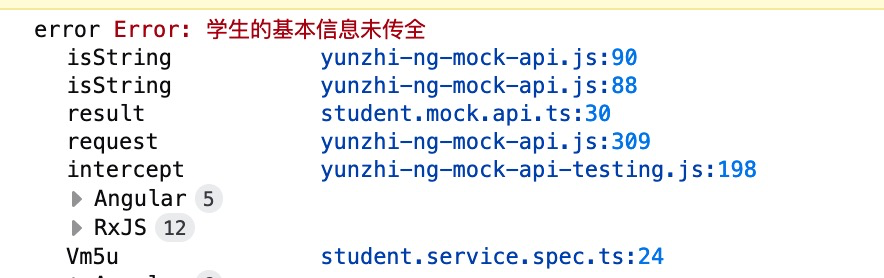
此時(shí)將對(duì)該模擬后臺(tái)發(fā)起請(qǐng)求時(shí),如果未傳入相應(yīng)的信息,`HttpClient`則會(huì)接收到了一個(gè)`error`。我們借用StudentService的測試文件來測試下發(fā)起請(qǐng)求時(shí)如果沒有傳入特定的字段,怎樣來獲取這個(gè)`error`:
```typescript
+++ b/first-app/src/app/service/student.service.spec.ts
@@ -1,16 +1,26 @@
-import { TestBed } from '@angular/core/testing';
+import {TestBed} from '@angular/core/testing';
-import { StudentService } from './student.service';
+import {StudentService} from './student.service';
+import {MockApiTestingModule} from '../mock-api/mock-api-testing.module';
+import {HttpClient} from '@angular/common/http';
describe('StudentService', () => {
let service: StudentService;
beforeEach(() => {
- TestBed.configureTestingModule({});
+ TestBed.configureTestingModule({
+ imports: [
+ MockApiTestingModule
+ ]
+ });
service = TestBed.inject(StudentService);
});
- it('should be created', () => {
+ fit('should be created', () => {
expect(service).toBeTruthy();
// TestBed.inject()可獲取到當(dāng)前動(dòng)態(tài)測試模塊的所有服務(wù)
+ const httpClient = TestBed.inject(HttpClient);
+ httpClient.post('/student', {})
+ .subscribe(success => console.log('success', success),
+ error => console.log('error', error));
});
});
```
當(dāng)MockApi發(fā)生異常時(shí),將會(huì)觸發(fā)`subscribe`中的`error`方法,這與正常的后臺(tái)請(qǐng)求報(bào)錯(cuò)的方式一致:
## 返回預(yù)請(qǐng)求
有了MockApi后,我們?cè)赟tudentService中發(fā)起這個(gè)請(qǐng)求:
```typescript
+++ b/first-app/src/app/service/student.service.ts
@@ -2,13 +2,14 @@ import {Injectable} from '@angular/core';
import {Observable, of} from 'rxjs';
import {Student} from '../entity/student';
import {Clazz} from '../entity/clazz';
+import {HttpClient} from '@angular/common/http';
@Injectable({
providedIn: 'root'
})
export class StudentService {
- constructor() {
+ constructor(private httpClient: HttpClient) {
}
/**
@@ -22,6 +23,6 @@ export class StudentService {
email: data.email,
clazz: new Clazz({id: data.clazzId})
});
- return of(student);
+ // 將預(yù)請(qǐng)求信息返回
+ return this.httpClient.post<Student>('/student', student);
}
```
## 組件調(diào)用
其它工作準(zhǔn)備完畢后,組件調(diào)用便成了最簡單的一環(huán):
```typescript
+++ b/first-app/src/app/student/add/add.component.ts
@@ -2,7 +2,7 @@ import {Component, OnInit} from '@angular/core';
import {FormControl, FormGroup, Validators} from '@angular/forms';
import {YzValidators} from '../../yz-validators';
import {YzAsyncValidators} from '../../yz-async-validators';
-import {HttpClient} from '@angular/common/http';
+import {StudentService} from '../../service/student.service';
@Component({
selector: 'app-add',
@@ -12,7 +12,7 @@ import {HttpClient} from '@angular/common/http';
export class AddComponent implements OnInit {
formGroup: FormGroup;
- constructor(private httpClient: HttpClient, private yzAsyncValidators: YzAsyncValidators) {
+ constructor(private studentService: StudentService, private yzAsyncValidators: YzAsyncValidators) {
this.formGroup = new FormGroup({
name: new FormControl('', Validators.required),
number: new FormControl('', Validators.required, yzAsyncValidators.numberNotExist()),
@@ -26,6 +26,15 @@ export class AddComponent implements OnInit {
}
onSubmit(): void {
- console.log('submit');
+ const student = this.formGroup.value① as② {
+ name: string,
+ number: string,
+ phone: string,
+ email: string,
+ clazzId: number
+ };
+ this.studentService.add(student)
+ .subscribe(success => console.log('保存成功', success),
+ error => console.log('保存失敗', error));
}
}
```
- ① 可以使用`FormGroup.value`來獲取整個(gè)`FormGroup`中所有`FormControl`的值
- ② 需要注意的是,這個(gè)雖然可能使用`as`將其轉(zhuǎn)換為任意值,但這種轉(zhuǎn)換也帶來了一定的風(fēng)險(xiǎn),比如我們?cè)诔跏蓟痐FormGroup`時(shí),誤把`email`寫成了`emial`。
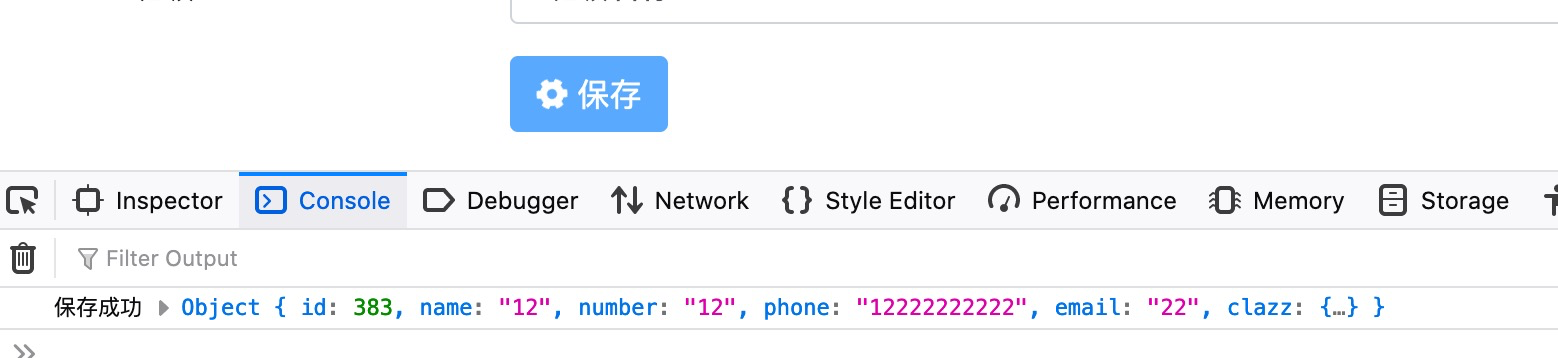
填寫完所有的字段后,保存成功。
其實(shí)有時(shí)候我們很難將`onSubmit()`一次性的書寫成功,比如我們以后需要加入保存成功后路由的跳轉(zhuǎn)信息。所以在開發(fā)過程中往往需要屢次點(diǎn)擊保存按鈕,而點(diǎn)擊該按鈕前卻需要將表單的所有字段輸全,這明顯是個(gè)重復(fù)的勞動(dòng),做為**懶人**的我們?cè)趺茨茉试S些類事情的發(fā)生。
如果在點(diǎn)擊保存按鈕前這些信息全部都為我們自動(dòng)填寫好,那該多好呀。?? 還不快用單元測試?
```typescript
+++ b/first-app/src/app/student/add/add.component.spec.ts
@@ -8,6 +8,8 @@ import {getTestScheduler} from 'jasmine-marbles';
import {Observable, of} from 'rxjs';
import {map} from 'rxjs/operators';
import {LoadingModule} from '../../directive/loading/loading.module';
+import {randomString} from '@yunzhi/ng-mock-api/testing';
+import {randomNumber} from '@yunzhi/ng-mock-api';
describe('student -> AddComponent', () => {
let component: AddComponent;
@@ -40,6 +42,24 @@ describe('student -> AddComponent', () => {
fixture.autoDetectChanges();
});
+ fit('自動(dòng)填充要新建的學(xué)生數(shù)據(jù)', () => {
+ // 固定寫法
+ getTestScheduler().flush();
+ fixture.detectChanges();
+
+ component.formGroup.setValue({
+ name: randomString('姓名'),
+ number: randomNumber().toString(),
+ phone: '13900000000',
+ email: '123@yunzhi.club',
+ clazzId: randomNumber(10)
+ });
+
+ // 固定寫法
+ getTestScheduler().flush();
+ fixture.autoDetectChanges();
+ });
+
it('理解map操作符', () => {
// 數(shù)據(jù)源發(fā)送數(shù)據(jù)1
const a = of(1) as Observable<number>;
```
在此單元測試代碼的支持上,我們?cè)僖膊槐厥謩?dòng)地填寫這些數(shù)據(jù)了:

這絕對(duì)是個(gè)提升生產(chǎn)力的好方法。好了,就到這里,休息一會(huì)。
| 名稱 | 鏈接 |
| ----------------- | ------------------------------------------------------------ |
| HTMLElement | [https://developer.mozilla.org/en-US/docs/Web/API/HTMLElement](https://developer.mozilla.org/en-US/docs/Web/API/HTMLElement) |
| HTMLButtonElement | [https://developer.mozilla.org/en-US/docs/Web/API/HTMLButtonElement](https://developer.mozilla.org/en-US/docs/Web/API/HTMLButtonElement) |
| 本節(jié)源碼 | [https://github.com/mengyunzhi/angular11-guild/archive/step7.2.6.zip](https://github.com/mengyunzhi/angular11-guild/archive/step7.2.6.zip) |
- 序言
- 第一章 Hello World
- 1.1 環(huán)境安裝
- 1.2 Hello Angular
- 1.3 Hello World!
- 第二章 教師管理
- 2.1 教師列表
- 2.1.1 初始化原型
- 2.1.2 組件生命周期之初始化
- 2.1.3 ngFor
- 2.1.4 ngIf、ngTemplate
- 2.1.5 引用 Bootstrap
- 2.2 請(qǐng)求后臺(tái)數(shù)據(jù)
- 2.2.1 HttpClient
- 2.2.2 請(qǐng)求數(shù)據(jù)
- 2.2.3 模塊與依賴注入
- 2.2.4 異步與回調(diào)函數(shù)
- 2.2.5 集成測試
- 2.2.6 本章小節(jié)
- 2.3 新增教師
- 2.3.1 組件初始化
- 2.3.2 [(ngModel)]
- 2.3.3 對(duì)接后臺(tái)
- 2.3.4 路由
- 2.4 編輯教師
- 2.4.1 組件初始化
- 2.4.2 獲取路由參數(shù)
- 2.4.3 插值與模板表達(dá)式
- 2.4.4 初識(shí)泛型
- 2.4.5 更新教師
- 2.4.6 測試中的路由
- 2.5 刪除教師
- 2.6 收尾工作
- 2.6.1 RouterLink
- 2.6.2 fontawesome圖標(biāo)庫
- 2.6.3 firefox
- 2.7 總結(jié)
- 第三章 用戶登錄
- 3.1 初識(shí)單元測試
- 3.2 http概述
- 3.3 Basic access authentication
- 3.4 著陸組件
- 3.5 @Output
- 3.6 TypeScript 類
- 3.7 瀏覽器緩存
- 3.8 總結(jié)
- 第四章 個(gè)人中心
- 4.1 原型
- 4.2 管道
- 4.3 對(duì)接后臺(tái)
- 4.4 x-auth-token認(rèn)證
- 4.5 攔截器
- 4.6 小結(jié)
- 第五章 系統(tǒng)菜單
- 5.1 延遲及測試
- 5.2 手動(dòng)創(chuàng)建組件
- 5.3 隱藏測試信息
- 5.4 規(guī)劃路由
- 5.5 定義菜單
- 5.6 注銷
- 5.7 小結(jié)
- 第六章 班級(jí)管理
- 6.1 新增班級(jí)
- 6.1.1 組件初始化
- 6.1.2 MockApi 新建班級(jí)
- 6.1.3 ApiInterceptor
- 6.1.4 數(shù)據(jù)驗(yàn)證
- 6.1.5 教師選擇列表
- 6.1.6 MockApi 教師列表
- 6.1.7 代碼重構(gòu)
- 6.1.8 小結(jié)
- 6.2 教師列表組件
- 6.2.1 初始化
- 6.2.2 響應(yīng)式表單
- 6.2.3 getTestScheduler()
- 6.2.4 應(yīng)用組件
- 6.2.5 小結(jié)
- 6.3 班級(jí)列表
- 6.3.1 原型設(shè)計(jì)
- 6.3.2 初始化分頁
- 6.3.3 MockApi
- 6.3.4 靜態(tài)分頁
- 6.3.5 動(dòng)態(tài)分頁
- 6.3.6 @Input()
- 6.4 編輯班級(jí)
- 6.4.1 測試模塊
- 6.4.2 響應(yīng)式表單驗(yàn)證
- 6.4.3 @Input()
- 6.4.4 FormGroup
- 6.4.5 自定義FormControl
- 6.4.6 代碼重構(gòu)
- 6.4.7 小結(jié)
- 6.5 刪除班級(jí)
- 6.6 集成測試
- 6.6.1 惰性加載
- 6.6.2 API攔截器
- 6.6.3 路由與跳轉(zhuǎn)
- 6.6.4 ngStyle
- 6.7 初識(shí)Service
- 6.7.1 catchError
- 6.7.2 單例服務(wù)
- 6.7.3 單元測試
- 6.8 小結(jié)
- 第七章 學(xué)生管理
- 7.1 班級(jí)列表組件
- 7.2 新增學(xué)生
- 7.2.1 exports
- 7.2.2 自定義驗(yàn)證器
- 7.2.3 異步驗(yàn)證器
- 7.2.4 再識(shí)DI
- 7.2.5 屬性型指令
- 7.2.6 完成功能
- 7.2.7 小結(jié)
- 7.3 單元測試進(jìn)階
- 7.4 學(xué)生列表
- 7.4.1 JSON對(duì)象與對(duì)象
- 7.4.2 單元測試
- 7.4.3 分頁模塊
- 7.4.4 子組件測試
- 7.4.5 重構(gòu)分頁
- 7.5 刪除學(xué)生
- 7.5.1 第三方dialog
- 7.5.2 批量刪除
- 7.5.3 面向?qū)ο?/a>
- 7.6 集成測試
- 7.7 編輯學(xué)生
- 7.7.1 初始化
- 7.7.2 自定義provider
- 7.7.3 更新學(xué)生
- 7.7.4 集成測試
- 7.7.5 可訂閱的路由參數(shù)
- 7.7.6 小結(jié)
- 7.8 總結(jié)
- 第八章 其它
- 8.1 打包構(gòu)建
- 8.2 發(fā)布部署
- 第九章 總結(jié)